How to Download Shizuku APK Download from here Latest Version (2026 Guide)
4.3 / 290
10 Mins
Admin
Shizuku APK Download Latest Version (2026 Guide) Ads-Free!
It can be an incredibly risky and frustrating task to take control of your smartphone’s layout and customize advanced system properties. If you want to run deep system adjustments, modify system files, and use powerful automation tools, you are often forced to execute dangerous rooting codes on your smartphone. Modifying your phone manually exposes your device to major security threats. If you are looking for a clean, secure, and smart utility that grants advanced permissions to your favorite apps without root access, the official Shizuku APK download is the best choice for your device.

The Shizuku APK Download has become a very popular utility tool among online users across the USA, especially for those configuring Shizuku Android 14 and the latest Shizuku Android 15 builds. It bridges the gap between basic user settings and deep system access. This application uses a highly safe and secure native Shizuku wireless debugging protocol.
The app also ensures your device security framework stays fully intact and entirely safe from malicious data leaks. If you need a reliable, lightweight tool that runs smoothly and handles advanced application queries, executing the setup via the official package path com.moe.shizuku.privileged.api is an excellent move.

What Makes Shizuku APK Download So Special?
To understand why this utility is popular among online users, you need to look at its technical framework. The application acts like a bridge between Android system APIs and your mobile applications without utilizing complex Android Debug Bridge background processes.
The app functions at zero system resource waste, while other likewise applications available online have complex code injection and heavy background data processes. It protects your data, keeps your privacy intact, and never uploads local files to external servers or monitors applications behind your back.
The app functions at zero system resource waste, while other likewise applications available online have complex code injection and heavy background data processes. It protects your data, keeps your privacy intact, and never uploads local files to external servers or monitors applications behind your back.

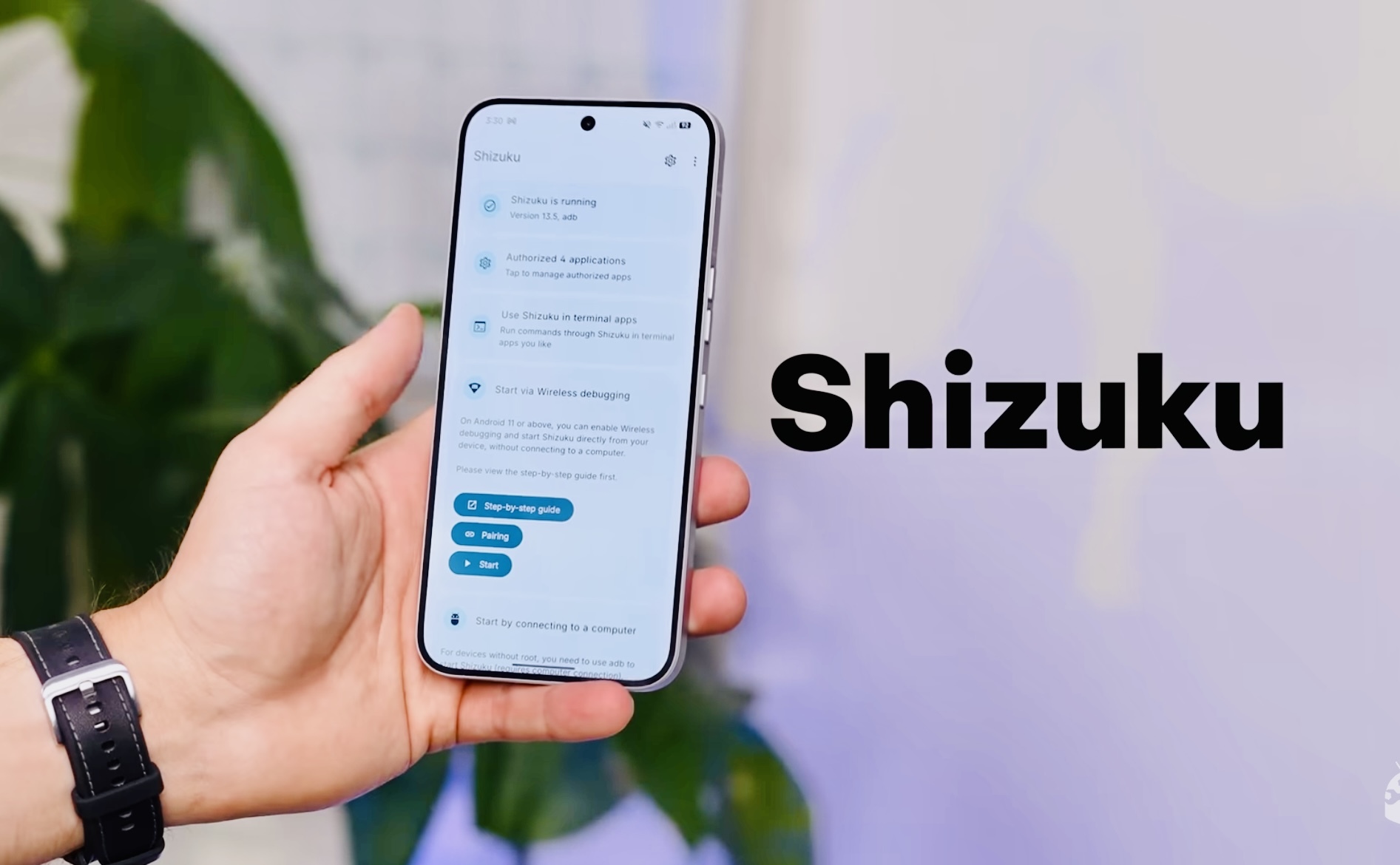
The dashboard layout of Shizuku apk download is very smooth, clean, and easy to navigate for the user. You will never feel lost because the dashboard interface guides you step-by-step through the Shizuku ADB setup sequence. The main screen displays the current status, active wireless ports, and running applications that have system action permissions.
If you want to discover more utility tools or hunt for the latest casino slots apk download, you must visit our homepage on this website. The developer team is very professional and active, providing timely updates to the application to ensure full compatibility with the latest Android security builds.
If you want to discover more utility tools or hunt for the latest casino slots apk download, you must visit our homepage on this website. The developer team is very professional and active, providing timely updates to the application to ensure full compatibility with the latest Android security builds.
Key Functional Features of Shizuku APK
Here are the clear and functional features of Shizuku apk download which you unlock right after completing the installation:
1. The Connection Monitor
The central control dashboard looks very perfect, tracking your real-time ADB status. It displays active wireless debugging ports and guides you in sequence to understand how to use Shizuku without root access.
2. The Authorized Apps Matrix
The application has a clean interface directory panel. You can manually view and manage exactly which tools you want to access the Shizuku system. You can toggle the access permission ON and OFF in a single click.
3. The Wireless Debugging Bridge
It features a highly specialized processing module which directly links into the Android developer options. It allows the application to execute high-tier commands without any physical cable connection.
4. The System Log Diagnostic Panel
To monitor active code execution logs, a dedicated utility station is built for power users. It checks history charts and easily drops troubleshooting background services.
The Security Benefits of a Non-Root System Service of Shizuku Apk Download
The Shizuku apk download is completely hassle-free and operates on a non-commercial, open-source framework to keep your device system stable and transparent. Online users can enjoy several distinct advantages:
- Zero System Root Risks: The application never breaks the official Android security layer. Your mobile banking applications and security locks will not be at risk.
- True Battery Optimization: The Shizuku Apk download is very lightweight, running silently in the background. It consumes extremely low background battery and minimizes smartphone data usage.
- Automatic Startup Logic: After completing the initial pairing sequence, you can configure the application to automatically launch its services. Whenever you connect to a verified Wi-Fi device or restart your device, it automatically boots up.
- Total Transparency: Users get absolute peace of mind because the system is transparent. It is fully open-source, visible online, and contains no hidden tracking scripts inside it.
Simple Step-by-Step Download and Installation Process of Shizuku Apk
Setting up this advanced utility software on your Android mobile smartphone is a very quick, simple, and direct task that takes only a couple of minutes to execute:
- Download the Setup File: First, click the verified Download APK button featured in this post to capture the latest official setup.
- Allow Unknown Sources: Open your system settings and allow installations from the “Unknown Sources” option before initializing the file execution.
- Run the Setup Wizard: Open your local file manager, navigate to your downloads directory, and tap on the installer file to launch the installation setup.
- Pair and Launch: Within a few seconds, the official app icon will appear on your device’s home screen. Open it, follow the on-screen Shizuku wireless debugging instructions, and enjoy the features.
If you want to discover a wider selection of safe, verified mobile utility application packages or want to look at new digital tools, you can always visit our main homepage updates at apkbasha.com.
Conclusion
In a nutshell, Shizuku Apk Download breaks the conventional mold of heavy and unsafe systems. It operates as a secure wireless debugging client with clear permissions and app control options. It consumes low memory and features a transparent interface. If you are fully ready to enjoy a gorgeous application that runs smoothly with a single tap, choosing this package will be an excellent move.
New Blog Posts
-
How to Download Poppy Playtime Chapter 4 APK Download for Android (2026 Guide)
-
How to Download R.E.P.O. Mobile APK Download for Android (2026 Latest Version)
-
How to Download Shizuku APK Download from here Latest Version (2026 Guide)
-
How to Download ReVanced Manager APK Latest Version (2026 Guide)
-
How to Download YouTube Music APK for Android (2026 Guide)
-
How to Download Seal Apk Latest Version 2026 Ads-Free
-
How to Download SmartTube Apk Latest Version 2026 Ads Free
-
How to Download Spotube APK free Latest Version 2026 (no ads)
-
How to Download LocalSend Apk Latest Version 2026 (ads free)
-
How to Download High 5 Casino Apk Later Version for Android 2026